Saving with GitHub
flowstore has no server, so it keeps your projects on GitHub, a free service for storing and sharing files. This page covers the few ideas you need and how to set it up.
What the words mean
| Word | In flowstore |
|---|---|
| Repo | Your project's folder on GitHub. One project, one repo. |
| Save | A snapshot of the project. Every save is kept, so earlier work is never lost. |
| History | The list of your saves. The repo's page on GitHub shows each one and what changed. |
| Draft (branch) | A separate copy for trying something without touching the main version. You will need one to collaborate with people so you don't overwrite each other's work. |
| Share | Adds people to the repo so they can open and save the project. |
| Token | A password-like string that lets flowstore save to your GitHub account. It stays in your browser. You will have to input it on any new machine where you want to work with your projects. |
Set up (once)
1Make a GitHub account
Sign up at github.com/signup. The free plan is all you need.
2Create a token
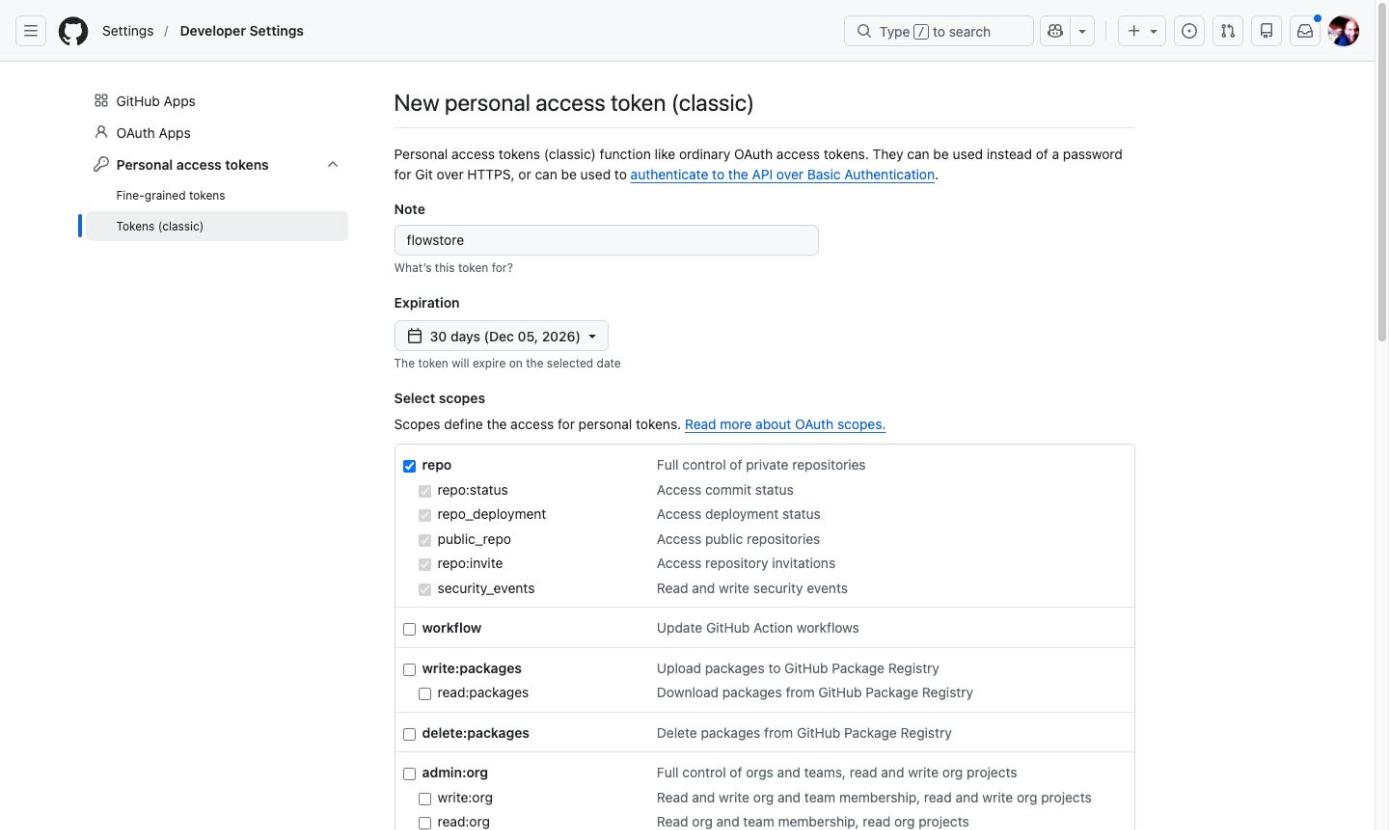
Open GitHub's new token page. The link fills in the note and the scope for you.
- Note: “flowstore”, already filled in.
- Expiration: the end of your course or project.
- Select scopes: repo, already ticked. It lets flowstore create repos, save to them, and add collaborators. Leave the other boxes empty.
- Scroll down, click Generate token, and copy it. GitHub shows it only once, so keep a copy somewhere safe.
3Add the token to flowstore
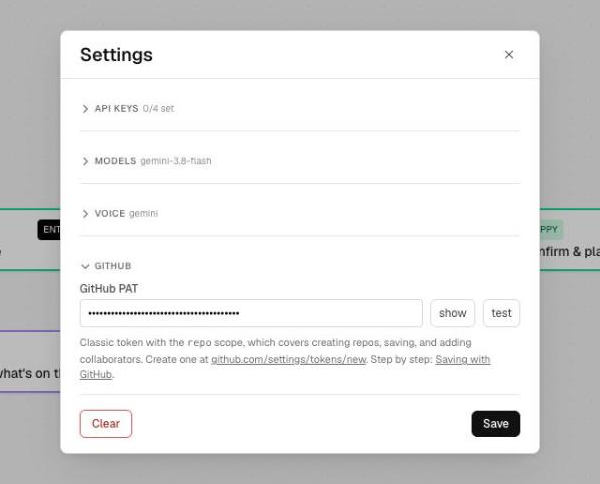
In the editor, click the gear icon, paste the token under GitHub PAT, and click test. “Connected as” and your GitHub name confirm it works. Then click Save at the bottom of the dialog.
Save a project
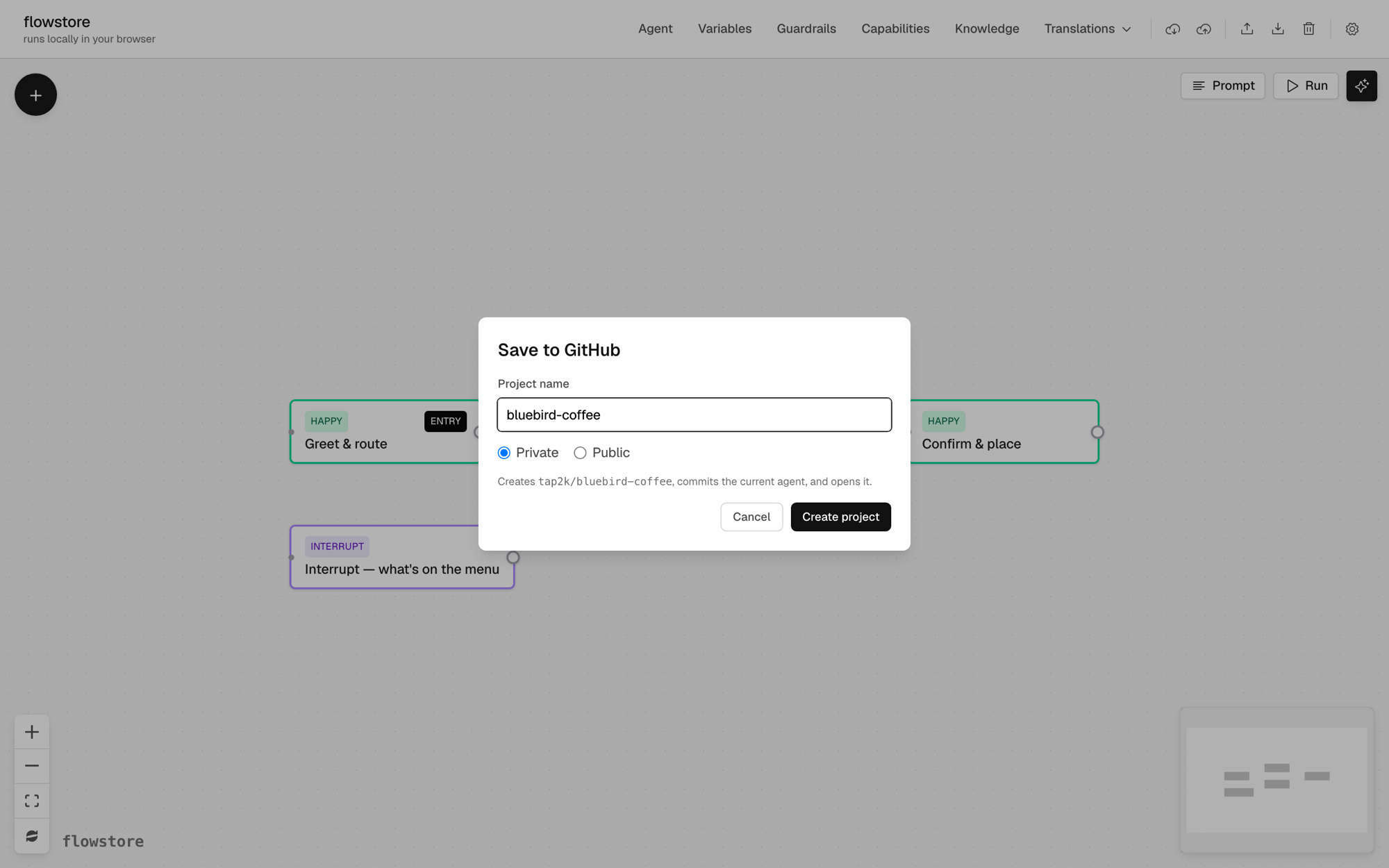
Click Save to GitHub, the cloud with an up arrow, and name the project. New repos are private. Click Create project.
The repo's name now shows under the project name, top left, with the GitHub mark. That tells you whose project you are in. Later saves go to the same repo. Click the cloud and choose Save to main to save with a short note describing the change. Or press Cmd+S (Ctrl+S on Windows) to save right away.
Everyday use
- Open a project. The cloud with a down arrow opens any of your repos, or a public one by its URL.
- Make your own branch (or stay on main). Click the cloud and choose Save to a new branch. That makes a draft; the main version stays as it was.
- Work with others. The Share button (a person with a plus) adds collaborators by GitHub username. Make sure to coordinate your work with them, ideally in your own branches.
- Stay updated. Click Refresh from GitHub to get their latest saves.
- “Someone else saved changes.” Two people saved at once. Choose Save as a new draft and nothing is lost on either side.
- When you are ready to integrate changes. Merging happens on GitHub, not in flowstore. Open the repo on GitHub, go to Pull requests, click New pull request, and pick your branch. Then click Create pull request, then Merge pull request. If two branches changed the same lines, GitHub asks you to pick which version to keep.
Sharing
Click Share, the person with a plus, and type a GitHub username. Choose Read & write to let them edit and save, or Read to let them only open the project. GitHub sends them an invitation, and the list shows “invite pending” until they accept it.
Public and private repos
When you save a new project, you choose Private or Public. Private is the default.
- Private. Only you and the people you share it with can see the repo.
- Public. Anyone with the link can see it. They can open it in flowstore without a GitHub account by pasting the URL under Public repo URL. Only the people you share it with can save to it.
To change it later, open the repo on GitHub, go to Settings, and use Change visibility at the bottom of the page. Your API keys and GitHub token stay in your browser and are never saved to the repo, so making a repo public does not expose them.
Learn more
GitHub's own Hello World guide explains repos, branches and commits in more depth. You don't need it to use flowstore.